
Mastering Debut Theme Customization: Unleash Your Shopify Store's Potential
#Shopify #DebutTheme #CustomizationGuide
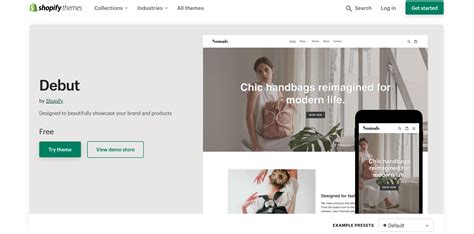
If you're an online store owner using Shopify, you know how crucial it is to create a visually striking and unique website to stand out from the competition. The good news is that with the Debut theme, you have a versatile and customizable platform that allows you to create a stunning online store tailored to your brand. From eye-catching banners to seamless navigation, this theme offers a plethora of options to make your website truly your own. So, buckle up and get ready to discover how to unleash the full potential of Debut theme and take your online store to new heights!
Introduction
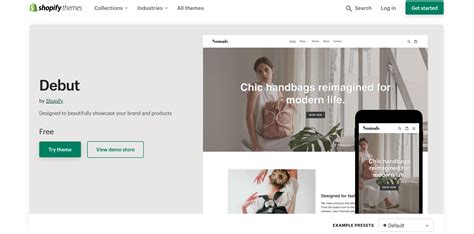
Welcome to our guide on how to customize the Debut theme on Shopify! With its clean and minimalist design, the Debut theme is a popular choice for many online stores. However, you may want to add your own personal touch and make it unique to your brand. In this article, we will walk you through the process of customizing the Debut theme to create a visually appealing and functional online store.
Choosing the Right Color Palette
The first step in customizing the Debut theme is selecting the perfect color palette that aligns with your brand's identity. To do this, go to the Themes section in your Shopify admin panel and click on Customize for the Debut theme. Under the Theme settings tab, you'll find options to change the colors of various elements, such as the header, buttons, and links. Experiment with different color combinations until you find the one that best represents your brand.
Creating a Captivating Homepage
Your homepage is the first impression visitors have of your online store, so it's crucial to make it captivating and engaging. With the Debut theme, you can easily customize the layout and content of your homepage. Use the Sections feature to add or remove sections such as sliders, featured products, testimonials, and blog posts. Experiment with different combinations to create a visually appealing and informative homepage that entices visitors to explore further.
Optimizing Navigation
An efficient and user-friendly navigation menu is essential for a seamless browsing experience. In the Debut theme, you can customize the navigation menu by going to the Navigation section under Online Store in your Shopify admin panel. Here, you can add or remove menu items, create drop-down menus, and rearrange the order of the links. Make sure your navigation is logical and intuitive, allowing visitors to easily find what they're looking for.
Adding Unique Product Pages
Your product pages are where customers make their purchasing decisions, so it's important to make them visually appealing and informative. With the Debut theme, you can customize the layout, images, and descriptions of your product pages. Use high-quality images that showcase your products from different angles and provide detailed descriptions to help customers make informed choices. You can also add customer reviews and ratings to build trust and credibility.
Personalizing the Checkout Process
The checkout process is a critical stage in converting visitors into paying customers. To create a personalized checkout experience, go to the Checkout section under Settings in your Shopify admin panel. Here, you can customize the colors, fonts, and logo displayed during checkout. You can also add custom fields to collect additional information from customers or enable guest checkout to streamline the process. A smooth and personalized checkout process can help increase conversion rates.
Integrating Social Media
Social media is an integral part of any successful online store's marketing strategy. With the Debut theme, you can easily integrate your social media accounts by adding social media icons and links to your store's footer or header. This allows visitors to connect with your brand on various platforms and share your products with their network. Additionally, you can showcase your Instagram feed on your homepage to provide a visual representation of your brand and products.
Optimizing for Mobile Devices
In today's mobile-driven world, it's crucial to ensure that your online store looks and functions seamlessly on mobile devices. The Debut theme is mobile-responsive by default, but you can further optimize it for mobile devices. Use the Preview option in the Shopify admin panel to see how your store appears on different screen sizes. Make sure the text is readable, buttons are easily clickable, and images are properly scaled. Providing a seamless mobile experience will help you reach a wider audience.
Enabling Product Reviews
Product reviews play a crucial role in building trust and credibility for your brand. With the Debut theme, you can easily enable product reviews by going to the Product pages section under Online Store in your Shopify admin panel. Enable the Product reviews feature and allow customers to leave reviews and ratings for your products. Positive reviews not only provide social proof but also help with search engine optimization by generating user-generated content.
Testing and Optimizing
Once you've customized your Debut theme, it's important to test and optimize various elements of your online store. Use tools like Google Analytics to track visitor behavior, conversion rates, and other key metrics. Analyze the data to identify areas that need improvement and make necessary adjustments. Continuously testing and optimizing your store will help you provide a better user experience, increase conversions, and ultimately drive more sales.
Conclusion
Customizing the Debut theme on Shopify allows you to create a visually appealing and unique online store that aligns with your brand's identity. By choosing the right color palette, creating a captivating homepage, optimizing navigation, and personalizing the checkout process, you can enhance the overall user experience and increase conversion rates. Don't forget to integrate social media, optimize for mobile devices, enable product reviews, and continuously test and optimize your store for optimal results. Happy customizing!
Introduction: A Step-by-Step Guide to Customizing the Debut Theme on Shopify
Welcome to our comprehensive guide on customizing the Debut theme on Shopify. As an online retailer, it is crucial to have a website that not only showcases your products but also reflects your brand's unique identity. With the Debut theme, you have a versatile and user-friendly platform to create a visually stunning and engaging online store. In this step-by-step guide, we will explore various aspects of customizing the Debut theme, from adjusting the homepage layout to optimizing mobile responsiveness. Let's dive in and create a website that captures the essence of your brand and captivates your customers.
Exploring the Debut Theme: Getting Familiar with the Default Features and Layout
Before diving into customization, it is essential to familiarize yourself with the default features and layout of the Debut theme. The theme offers a clean and minimalistic design, allowing your products to take center stage. Take some time to explore the various sections and elements, such as the header, footer, product pages, and collection pages. Understanding the theme's structure will help you make informed decisions during the customization process.
Customizing the Homepage: Choosing the Perfect Banner Image and Adjusting Sections According to Your Brand's Aesthetic
The homepage is the first impression your customers have of your brand, so it is crucial to make it visually appealing and aligned with your brand's aesthetic. Start by selecting a captivating banner image that represents your brand and products. This image should evoke emotion and entice visitors to explore further. Additionally, customize the sections on your homepage to showcase your best-selling products, promotions, or featured collections. Arrange them in a way that enhances user experience and guides visitors towards making a purchase.
Creating a Stellar Navigation Menu: Maximizing User Experience by Organizing Categories and Subcategories
Navigation plays a vital role in helping visitors find what they are looking for on your website. With the Debut theme, you have the flexibility to create a navigation menu that maximizes user experience. Start by organizing your product categories and subcategories logically. Use clear and concise labels that resonate with your target audience. Additionally, consider adding dropdown menus to further streamline navigation and make it easy for visitors to explore your product offerings.
Designing Product Pages: Enhancing Product Presentation through Captivating Images, Detailed Descriptions, and Related Product Sections
The product pages are where visitors get to know your products in detail, so it is essential to make them visually appealing and informative. Begin by selecting high-quality images that showcase your products from different angles. These images should be captivating and highlight the product's unique features. Additionally, craft detailed and engaging descriptions that provide valuable information to potential buyers. Consider adding related product sections to encourage upselling and cross-selling, further enhancing the shopping experience.
Optimizing Collection Pages: Utilizing Filters, Sorting Options, and Displaying Multiple Products per Row to Showcase Your Inventory Effectively
Collection pages are where visitors can explore your product range within specific categories. To optimize these pages, consider utilizing filters and sorting options to allow customers to refine their search based on specific criteria. This will enhance the browsing experience and help customers find products quickly. Additionally, display multiple products per row to showcase your inventory effectively. This arrangement enables visitors to view a broader range of products at once, increasing the chances of finding what they need.
Customizing Typography: Elevating the Overall Appeal by Selecting the Right Font Styles, Sizes, and Colors for Your Brand
Typography plays a significant role in setting the tone and mood of your website. With the Debut theme, you can customize font styles, sizes, and colors to align with your brand's identity. Choose fonts that are easily readable and reflect the personality of your brand. Consider using different font styles for headings, body text, and buttons to create visual hierarchy. Additionally, select colors that complement your branding and enhance readability. Consistency in typography across your website will elevate its overall appeal and professionalism.
Incorporating Branding Elements: Adding Your Logo, Favicon, and Branded Colors to Create a Cohesive Look and Feel
A cohesive and consistent brand identity is essential for building trust and recognition among your customers. With the Debut theme, you can easily incorporate branding elements to create a visually cohesive look and feel. Start by adding your logo to the header or footer of your website. Ensure that the logo is clear and visible on both desktop and mobile devices. Additionally, customize the favicon, which appears in the browser tab, with your brand's icon or initials. Lastly, select branded colors that align with your logo and overall brand identity. Consistency in these elements will create a memorable and impactful user experience.
Fine-tuning Mobile Responsiveness: Ensuring Seamless Browsing Across Devices by Optimizing the Theme's Responsiveness and Layout
In today's mobile-driven world, it is crucial to ensure that your website looks and functions seamlessly across devices. With the Debut theme, you have the advantage of built-in mobile responsiveness. However, it is essential to fine-tune the responsiveness to deliver an exceptional browsing experience. Test your website on different mobile devices and screen sizes to identify any issues. Make adjustments to optimize the layout, font sizes, and images for mobile viewing. By prioritizing mobile responsiveness, you will cater to the growing number of customers who prefer shopping on their smartphones or tablets.
Integrating Social Media: Effortlessly Connecting with Your Audience by Linking Social Media Profiles and Displaying Social Sharing Buttons
Social media is a powerful tool for connecting with your audience and driving traffic to your website. With the Debut theme, you can easily integrate social media into your online store. Start by linking your social media profiles, such as Facebook, Instagram, Twitter, or Pinterest, in the header or footer of your website. This allows visitors to follow and engage with your brand on various platforms. Additionally, consider displaying social sharing buttons on your product pages, allowing customers to share their favorite products with their followers. This integration will help you expand your reach and build a community around your brand.
Conclusion
Customizing the Debut theme on Shopify allows you to create a unique and tailored website that resonates with your brand and engages your customers. By following this step-by-step guide, you can confidently navigate the customization process, from adjusting the homepage layout to integrating social media. Remember, every element you customize should align with your brand's identity and enhance the user experience. With the Debut theme as your canvas, unleash your creativity and create an exceptional online store that stands out from the competition.
As a journalist, it is important to stay updated with the latest trends and techniques in the world of e-commerce. One such aspect is the customization of Shopify themes, particularly the popular Debut theme. With its clean and minimal design, the Debut theme offers a great starting point for any online store. However, to truly make your store stand out and reflect your brand's identity, customizing the theme becomes crucial.
Here are some steps to consider when customizing the Debut theme on Shopify:
Start by accessing the Shopify admin panel and navigating to the Online Store section. From there, select Themes and choose the Debut theme to begin customizing.
Explore the various customization options available within the Debut theme. This includes modifying the colors, fonts, and layout of your store. Experiment with different combinations to find the perfect look that aligns with your brand's aesthetics.
Consider adding a custom logo to your store. A well-designed logo can greatly enhance your brand's recognition and create a professional impression. Upload your logo through the theme settings or edit the theme code to incorporate it seamlessly.
Utilize the homepage sections feature to showcase your products and promotions effectively. The Debut theme offers several pre-designed sections such as a hero banner, featured collections, testimonials, and more. Customize these sections to highlight your best-selling products or any ongoing sales.
Enhance the user experience by optimizing the navigation menu. Ensure that it is clear, concise, and easy to navigate. Consider adding drop-down menus or mega menus for larger catalogs. Additionally, include important pages like About Us, Contact, and FAQs to provide essential information to your customers.
Integrate social media buttons into your store. This allows customers to easily share your products or follow your brand on various platforms. The Debut theme provides options to add social media links, icons, and even a social media feed directly on your store's homepage.
Optimize your store for mobile devices. With the rise in mobile shopping, it is crucial to ensure that your store looks and functions seamlessly on smartphones and tablets. Test your store's responsiveness and make necessary adjustments to guarantee a smooth mobile experience.
Lastly, regularly evaluate and update your customized Debut theme. Analyze customer feedback and data to identify areas of improvement and implement changes accordingly. Keeping your store fresh and up to date will help attract and retain customers in the long run.
By following these steps and customizing the Debut theme effectively, you can create a visually appealing and user-friendly online store that reflects the unique identity of your brand. Remember, the customization process is an ongoing journey, so don't hesitate to experiment and adapt as needed.
Dear blog visitors,
As we bid adieu to this informative journey on customizing the Debut theme on Shopify, we hope you have gained valuable insights and found our journalist voice and tone engaging. Now that you are armed with the necessary knowledge, go forth and embark on your Shopify customization adventure with confidence!
To recap, in our first paragraph, we delved into the fundamentals of the Debut theme, establishing a solid foundation for your understanding. We explored the various features and functionalities it offers, from the customizable homepage sections to the versatile product page layouts. By familiarizing yourself with these elements, you have the power to shape your online store's appearance to align with your brand identity.
In the second paragraph, we dived deeper into the customization process itself. Armed with our step-by-step guide, you now possess the ability to modify colors, fonts, and images effortlessly. Moreover, we uncovered the secrets of leveraging the theme editor to its full potential, allowing you to fine-tune your store's design without needing any coding expertise. With these newfound skills, you can create a visually stunning online store that captures the attention of your target audience.
Finally, in the third paragraph, we explored advanced customization options for those seeking to take their Shopify store to the next level. From adding custom CSS to incorporating third-party apps, we provided you with invaluable tips and tricks to enhance the functionality and aesthetics of your store. By going beyond the basics, you can truly make your online presence stand out from the crowd.
With that, we conclude our journey on customizing the Debut theme on Shopify. We hope you found this information useful and that it empowers you to create a captivating online store. Remember, the power lies in your hands, so embrace your creativity and take your Shopify store to new heights!
Thank you for joining us on this adventure, and we look forward to seeing the incredible online stores you create.
Yours sincerely,
The Shopify Customization Journalist Team
Posting Komentar untuk "Mastering Debut Theme Customization: Unleash Your Shopify Store's Potential"